: Solutions & Prevention](https://file-host.link/website/consolidateddesignwest-86bidz/assets/blog-images/0664f2b0-d4a8-4ac5-959d-5273d4fd1075/1775415657823116_aaa759998df047d2b6c077e033a19024/360.webp)
Introduction
A single printing defect can pull a flexible packaging run—and send a brand back to square one. Smeared colors, misregistered graphics, or pinhole contamination don't just look bad; they trigger reprints, delay shipments, and erode retailer confidence. In the U.S., flexible packaging is a $41.5 billion industry, and brands can't afford to lose shelf space to preventable quality failures.
Print quality on flexible packaging isn't just an aesthetic concern—it's critical to shelf appeal, brand perception, and regulatory compliance. 72% of American consumers report that packaging design directly influences their purchase decisions, making print fidelity a direct driver of sales performance.
Printing defects in flexible packaging are more common than most brands realize—and many stem from the same root causes. This guide breaks down the most frequent defects, from ink adhesion failures and color inconsistency to registration errors and surface contamination, along with the practical fixes and prevention steps that keep runs on schedule.
Key Takeaways
- Root causes include ink compatibility mismatches, press setup errors, substrate tension problems, and press contamination
- The most disruptive defects — adhesion failures, misregistration, dot gain, ghosting, and dirty prints — are also the most preventable
- Left unaddressed, these issues drive up material waste, push back launch timelines, and put brand consistency at risk
- Consistent press calibration, proactive ink management, and clean substrate handling stop most defects before they reach production
Most Common Printing Defects in Flexible Packaging
Most flexible packaging defects trace back to four root cause areas: ink formulation, equipment settings, substrate properties, and press environment. The five categories below cover the defects that show up most often on press, along with their triggers and corrective actions.
Ink Adhesion and Drying Failures
Ink adhesion failures occur when the selected ink is incompatible with the flexible substrate—PE, PP, or PET—resulting in peeling, smudging, or bleeding at the surface.
Flexible films often require corona pre-treatment to enhance surface energy and improve ink adhesion. Because surface energy decays over time, inline corona treatment is standard on high-speed flexible packaging lines to keep adhesion consistent across a full run.
Triggering conditions include:
- Incorrect pH levels in water-based inks (optimal range: 9.0–9.5)
- Wrong viscosity settings for the substrate type
- Using inks formulated for a different material
- Excessive humidity causing solvent-based ink to bleed into unprinted areas
- Insufficient corona treatment (target: 38–44 dynes/cm² for PE/PP, 44–52 dynes/cm² for PET)
Misregistration and Repeat Length Distortion
Misregistration happens when individual color layers fail to align precisely during multi-color printing. This results in blurred edges, color fringing, or shifted graphics. Flexible substrates are particularly vulnerable because they stretch or shift under web tension.
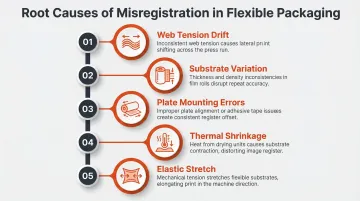
Misregistration typically follows one of these paths:
- Web tension drift — incorrect or inconsistent tension settings cause the substrate to wander between color stations
- Substrate variation — uneven thickness across a roll creates micro-stretching that throws alignment off
- Plate mounting errors — improper mounting or worn tape shifts the plate position mid-run
- Thermal shrinkage — excessive dryer temperatures cause the substrate to contract, compressing the repeat length
- Elastic stretch — printing on a slightly tensioned substrate produces a short repeat once it relaxes after the press
Dot Gain and Color Inconsistency
Dot gain occurs when printed halftone dots expand beyond their intended size on the substrate, making images appear darker or muddier than intended and reducing fine detail. This is especially problematic for brand colors that must match strict Pantone specifications.
Root causes include:
- Printing pressure set too high between the plate cylinder and substrate
- Plates that are too soft or have excessive thickness variation
- Incorrect anilox roller volume
- Mismatched anilox-to-plate line screen ratio (should exceed 4:1)
Ghosting and Halo Effects
Ghosting produces a faint, unintended duplicate image appearing alongside the main printed design. Mechanical ghosting is caused by insufficient ink replenishment in the anilox roller cells between impressions. Halos appear as ink rings around printed elements caused by speed differentials between plate and impression cylinders.
This occurs when:
- Complex layouts with large solid areas adjacent to fine details deplete ink supply
- Anilox roller ink volume is inadequate for the design
- Ink dries prematurely in the anilox cells
- Incorrect doctor blade pressure reduces ink transfer
- Press speed exceeds the system's ability to replenish ink
Contamination and Dirty Prints
Dirty prints—characterized by unwanted ink specks, white spots (hickeys), or streaks—result from dust, dried ink particles, or foreign matter adhering to the plate, anilox roller, or substrate. Flexible film webs generate high static charges (commonly 30 kV to 40 kV) due to friction and separation from idler rolls, drawing in airborne particles throughout a press run.
Common scenarios:
- Insufficient press room cleanliness controls
- Worn or clogged doctor blades leaving dried ink residue
- Contaminated ink that hasn't been properly filtered before use
- Static buildup attracting dust, fibers, and particulates to the substrate surface
- Nicked or damaged doctor blades causing streaking
What Happens When Printing Defects Go Unchecked
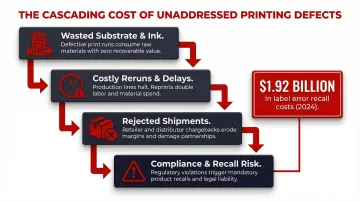
Failing to identify and address defects early creates cascading operational and financial consequences:
- Wasted substrate and ink on defective print runs
- Costly reruns that delay product launch timelines
- Rejected shipments creating supply chain disruptions
- Compliance issues in regulated industries like food and pharmaceuticals when required text or barcodes are unreadable
Those operational costs compound a harder-to-quantify problem: brand damage. Packaging is often a consumer's first physical interaction with a product, and defective print quality directly undermines shelf appeal and brand trust. Label errors alone cost the U.S. food industry an estimated $1.92 billion in direct recall expenses in 2024. Unreadable or low-quality barcodes can cost companies hundreds of thousands to millions of dollars in retailer penalties, fines, and discarded packages.
Warning Signs You're About to Experience a Defect
Many defects provide early visual or operational signals before they escalate to a full rejected run. Catching these signals early can prevent a full rejected run:
- Ink viscosity drift — readings moving outside the target range mid-run, or inconsistent color strength between the start and middle of a roll
- Static buildup on the substrate surface — or unusual debris accumulating on the printing plate between cleaning cycles
- Color shift or ghosting in press proofs that appears minor but worsens as the run progresses
How to Prevent Printing Defects in Flexible Packaging
Prevention is a set of systematic, repeatable practices built into every print job from pre-press through delivery—not reactive troubleshooting after a defect appears.
Ink Selection and Management
Before the run:
- Verify ink compatibility with the specific substrate: confirm correct ink chemistry (solvent-based, water-based, or UV), appropriate pH range for water-based inks, and target viscosity specifications
- Conduct adhesion tests (tape tests, rub tests) on press proofs before committing to a full run
- Filter inks before loading to remove dried particles or contaminants that cause hickeys and dirty prints
During the run:
- Monitor and adjust ink viscosity throughout the press run using consistent measurement intervals (for example, every 30 minutes during extended runs)
- Replace aged or contaminated ink rather than attempting to correct it with excessive solvent additions
- Use automated inline viscosity sensors where possible — manual cup measurements carry error margins of 5% to 10%, which is enough variance to affect pigment loading and color consistency across a long run
Plate and Press Setup Verification
Before each run:
- Verify that printing plates are clean, properly mounted with correct adhesive tape thickness, and free from worn or damaged relief areas
- Check that plate-to-anilox and plate-to-substrate pressure settings are calibrated to the minimum effective level ("kiss impression") to prevent dot gain and feathering
- Confirm that the anilox roller line count is appropriately matched to the plate screen frequency (the ratio should exceed 4:1)
- Ensure anilox cells are clean and free from dried ink that would reduce ink volume transfer and cause color inconsistency or ghosting
The kiss impression principle calls for the minimum pressure needed to transfer ink from anilox to plate and plate to substrate. Too much pressure causes dot gain, haloing, and dirty print. Too little causes skip-out and pinholing.
Substrate Tension and Web Control
Critical steps:
- Set and verify web tension according to the specific substrate material's properties before the run starts—flexible films like polyethylene behave differently from polyester or foil laminates
- Check substrate consistency within each roll (thickness uniformity) and between rolls, as thickness variation forces constant pressure adjustments mid-run that introduce color inconsistency and registration drift
- Adjust intermediate dryer temperatures conservatively to prevent substrate shrinkage
When tension or temperature settings fall outside spec, the consequences compound quickly: misregistration, repeat length variation, wrinkling, and in severe cases, blocking — where ink transfers to the back of the web due to film shrinkage or inadequate cooling drum function.
Contamination and Environmental Controls
Essential practices:
- Install and maintain antistatic bars and web-cleaning systems to neutralize static and remove dust before the substrate reaches the print station — film substrates in particular aggressively attract airborne particles
- Keep the press environment clean: schedule regular doctor blade inspections and replacements, maintain a lint-free cleaning protocol for plates and rollers, and ensure ink trays and pump systems are flushed and cleaned between jobs to prevent cross-contamination
Consolidated Design West applies these controls across all flexible packaging runs — from pre-press ink verification through final web tension checks — as part of a structured quality process built over 34 years of commercial print production.
Tips for Long-Term Print Quality Control
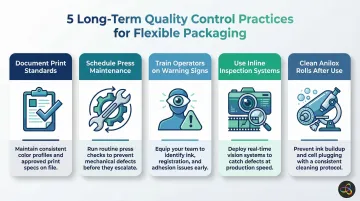
Consistent print quality across flexible packaging requires ongoing systems, not just pre-press checklists. Build these practices into every project:
- Document a print standard for each SKU—approved press proofs, Delta E color tolerances, and substrate specs—so every reprint is judged against a verified benchmark, not operator memory
- Schedule press maintenance proactively: log bearing inspections, gear lubrication, anilox assessments, and doctor blade replacements rather than addressing them after a problem appears
- Train operators and QC staff to spot early defect warning signs (viscosity drift, color shift, static buildup) and give them authority to pause a run before it becomes a scrapped roll
- Use inline color measurement or vision inspection systems on long runs to catch registration drift or color deviation before it compounds into a costly reject
- Clean anilox rolls immediately after use and verify cell condition under a microscope—dried ink plugs the microscopic cells, reducing ink volume and causing ghosting and weak color over time (per Harper Corporation's flexo maintenance guidance)
Conclusion
Printing defects in flexible packaging have identifiable causes—ink incompatibility, pressure miscalibration, substrate tension issues, and contamination. Each can be systematically prevented with the right preparation, materials, and press discipline.
The real costs of defects — wasted materials, delayed launches, lost shelf presence — add up fast. Proactive quality management stops those costs before they start.
Consolidated Design West has spent over 34 years helping brands across beauty, food and beverage, and consumer goods get flexible packaging right the first time. That means press-ready substrates, validated ink systems, and quality checkpoints built into production — not applied as an afterthought.
Frequently Asked Questions
What are common flexo printing problems?
The most frequently encountered issues in flexographic printing on flexible packaging include ink adhesion failures, misregistration, dot gain, ghosting, dirty prints caused by contamination, and color inconsistency. Most stem from ink, pressure, or substrate management issues.
What causes ghosting in flexo?
Ghosting is caused by insufficient ink re-supply to the anilox roller between impressions, often due to low anilox ink volume, ink drying in the cells, or complex layouts that demand more ink than the system can replenish in time. Adjusting anilox volume and adding ink retarder are common corrective actions.
What is distortion in flexo printing?
Distortion occurs when the flexible printing plate wraps around the cylinder, causing the image to stretch in the print direction. Correcting it requires pre-press plate distortion compensation calculated from the plate and cylinder geometry before platemaking.
What are the challenges of flexible packaging?
Flexible packaging presents unique challenges that rigid substrates don't. Films stretch under tension, surface energy varies by material (requiring corona treatment for adhesion), and static electricity attracts contamination. Substrate thickness inconsistencies can also affect print pressure uniformity across a run.
What is a packaging defect?
A packaging defect is any deviation from the approved print standard or physical specification that affects appearance, functionality, or regulatory compliance. In flexible packaging, this covers visual issues like ghosting and misregistration, and functional failures like poor ink adhesion or blocking that compromise pack integrity.
How can I tell if my flexible packaging has printing defects before it ships?
Request press proofs approved against a documented color standard before full production, then conduct adhesion and rub tests on finished samples. A visual inspection under standardized lighting against the approved proof — combined with a packaging partner who has inline quality control — reduces the risk of defects reaching shipment.